Type a message
Join a room or open a private conversation and write normally in any supported language.
DICOMICS / CHAT IN PANELS
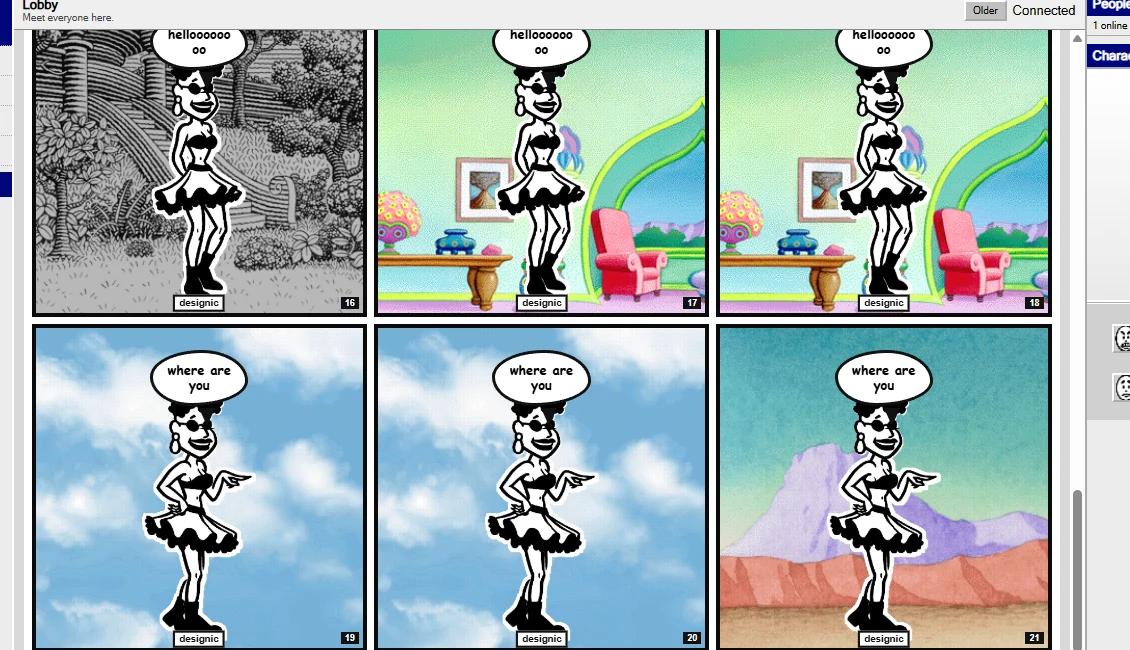
dComic turns live chat into comic panels as the conversation happens — with classic characters, expressive poses, speech bubbles and scene backgrounds.
Web · Desktop · Android · iPhone · iPad
Public rooms · Private chat · Comic mode · Transcript mode · PWA install

HOW DCOMIC WORKS
The chat stays live, but Comic Mode interprets the conversation and stages it as a sequence of illustrated panels.
Join a room or open a private conversation and write normally in any supported language.
The comic engine chooses the panel flow, character pose, expression, bubble style and scene.
Messages become a comic-strip conversation while Transcript Mode remains available whenever you want the plain chat.
BUILT FOR CONVERSATION
dComic keeps the familiar speed of real-time chat, then adds visual storytelling without turning the experience into a game or a social feed.
Lobby, Retro, Random, Music, Movies and admin-managed rooms update live over WebSocket.
Messages are staged into comic panels with speech, thought and action styles.
Choose from 25 characters with expressive poses drawn from the classic Comic Chat art archive.
Open one-to-one conversations with block controls and private comic presentation.
Arabic, English, mixed-direction text, emoji and international scripts work in the same conversation.
Install dComic from the browser and keep it on your desktop or phone like an app.
THE REAL INTERFACE
Rooms stay on the left, people and character controls stay on the right, and the center becomes the comic page. Nothing shown here is a concept render — it is the real dComic interface.
ONE TAP AWAY
dComic is a Progressive Web App. Open it in a supported browser, install it or add it to your home screen, and launch it directly next time.
Open dComic ↗Visit dComic in a modern browser on desktop, Android, iPhone or iPad.
Use Install or Add to Home Screen to keep dComic one tap away.
Join a room, type a message and watch the conversation become panels.
DICOMICS
Create an account, choose a classic character and enter the Lobby. The comic starts with the first message.