Capture a target with F2
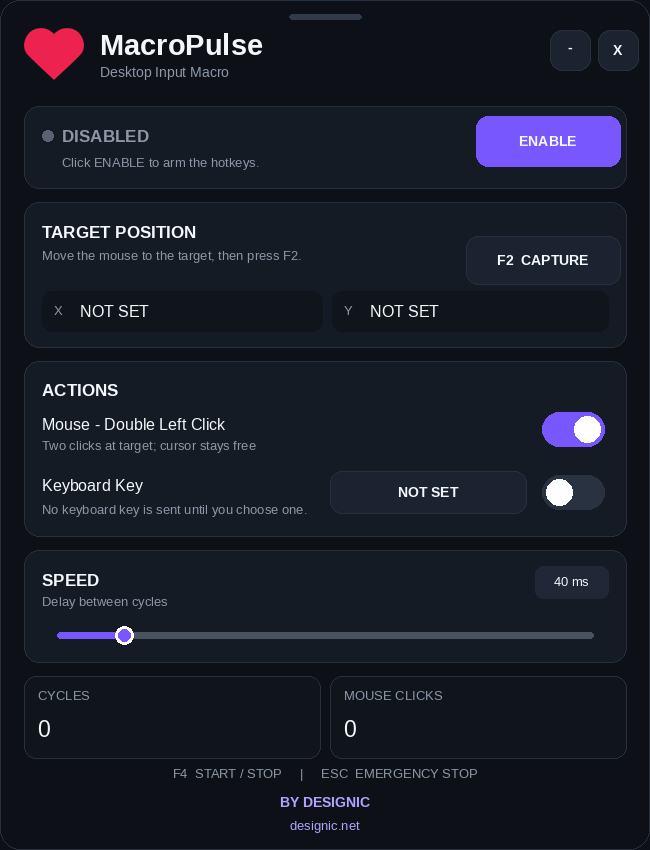
Move the cursor to the target and press F2 once. MacroPulse stores the exact target position for repeated clicks.
♥ WINDOWS DESKTOP UTILITY
v1.3Capture a mouse target once, run fast double-click cycles, and optionally add the keyboard key you choose. No keyboard key is assigned by default, so MacroPulse works as a clean mouse-only utility until you decide otherwise.
FEATURES
MacroPulse keeps the workflow intentionally small: capture a target, choose the actions you need, adjust the timing and run.
Move the cursor to the target and press F2 once. MacroPulse stores the exact target position for repeated clicks.
Run repeated double left-click actions at the captured target while keeping the action simple and visible.
Keyboard input starts as NOT SET. Pick the key you want only when you need it; otherwise mouse clicks continue on their own.
Clicks are sent to the captured target without forcing the visible cursor to remain locked on that position.
Use the Speed control to tune the delay between cycles for the desktop task you are working on.
F4 starts or stops MacroPulse. ESC provides an immediate emergency stop whenever you need to take control.
HOW IT WORKS
Open MacroPulse and click Enable to arm the global hotkeys.
Press F2 over the target. Leave Keyboard Key as NOT SET for mouse-only use, or choose the key you want.
Press F4 to start or stop the cycles. Press ESC at any time for an emergency stop.
USE CASES
Useful in personal workflows, desktop utilities, creative software and UI testing whenever repeated input becomes tedious.
Editable from the dedicated MacroPulse page options in Designic Theme Options.
Editable from the dedicated MacroPulse page options in Designic Theme Options.
Editable from the dedicated MacroPulse page options in Designic Theme Options.
Editable from the dedicated MacroPulse page options in Designic Theme Options.
MACROPULSE
MacroPulse includes a simple English documentation file with setup, hotkeys and usage instructions. Built by Designic for Windows desktop workflows.